 Otovar
Your car's digital logbook
Every service your mechanic does is saved to your car's history, so you never miss an inspection, insurance or maintenance date. For auto repair shops: work orders, work board, quotes, stock and income-expense tracking in one place.
Free · 10 languages · Same account on phone and computer
Everything about your car, in your pocket
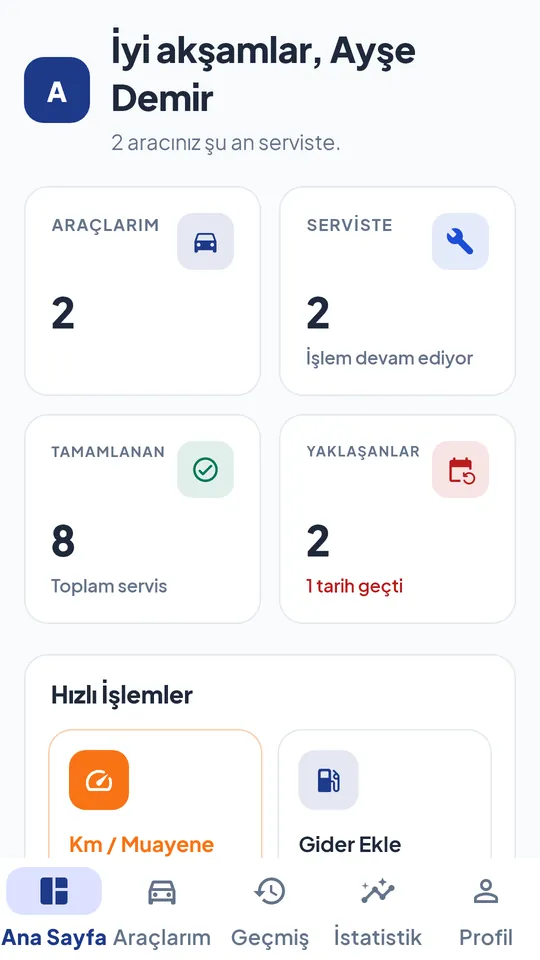
Your mechanic creates the service records; you just follow along. Even if your mechanic doesn't use Otovar, you can keep track of your mileage, inspection, insurance and expenses yourself.
Service history
All work done, replaced parts and costs on a single screen.
Reminders
Maintenance, inspection, traffic insurance and comprehensive insurance expiry dates show up right on time.
Connect with your mechanic
Connect using your mechanic's 8-character pairing code, and every job they do is added to your car's logbook.
Get quotes from mechanics
Describe what you need and get price quotes from nearby mechanics; compare price, rating and distance.
Appointments and extra work approval
Book an appointment with your mechanic, and see and approve any extra work found during the service along with its price.
Expense tracking
Add fuel, inspection, insurance and other expenses, and see your cost per km.
Run your workshop paper-free
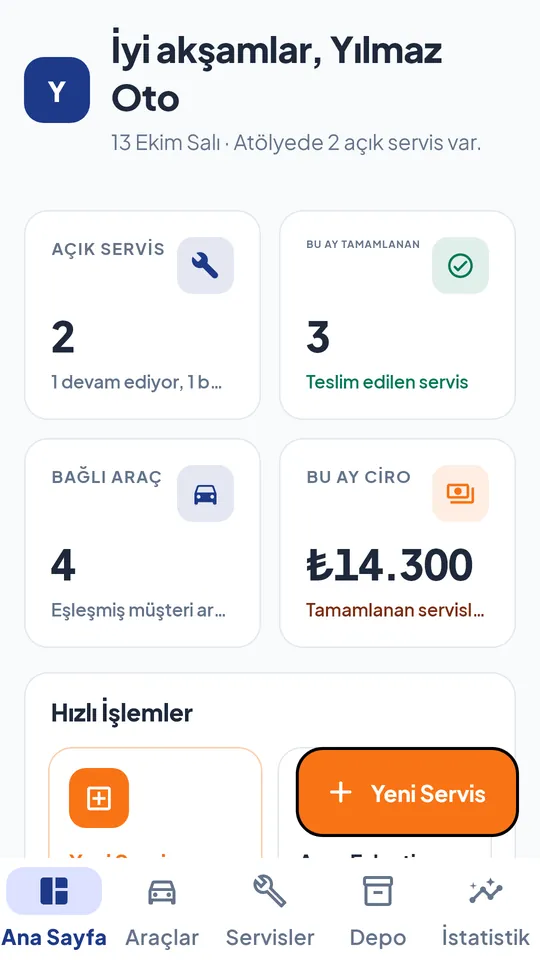
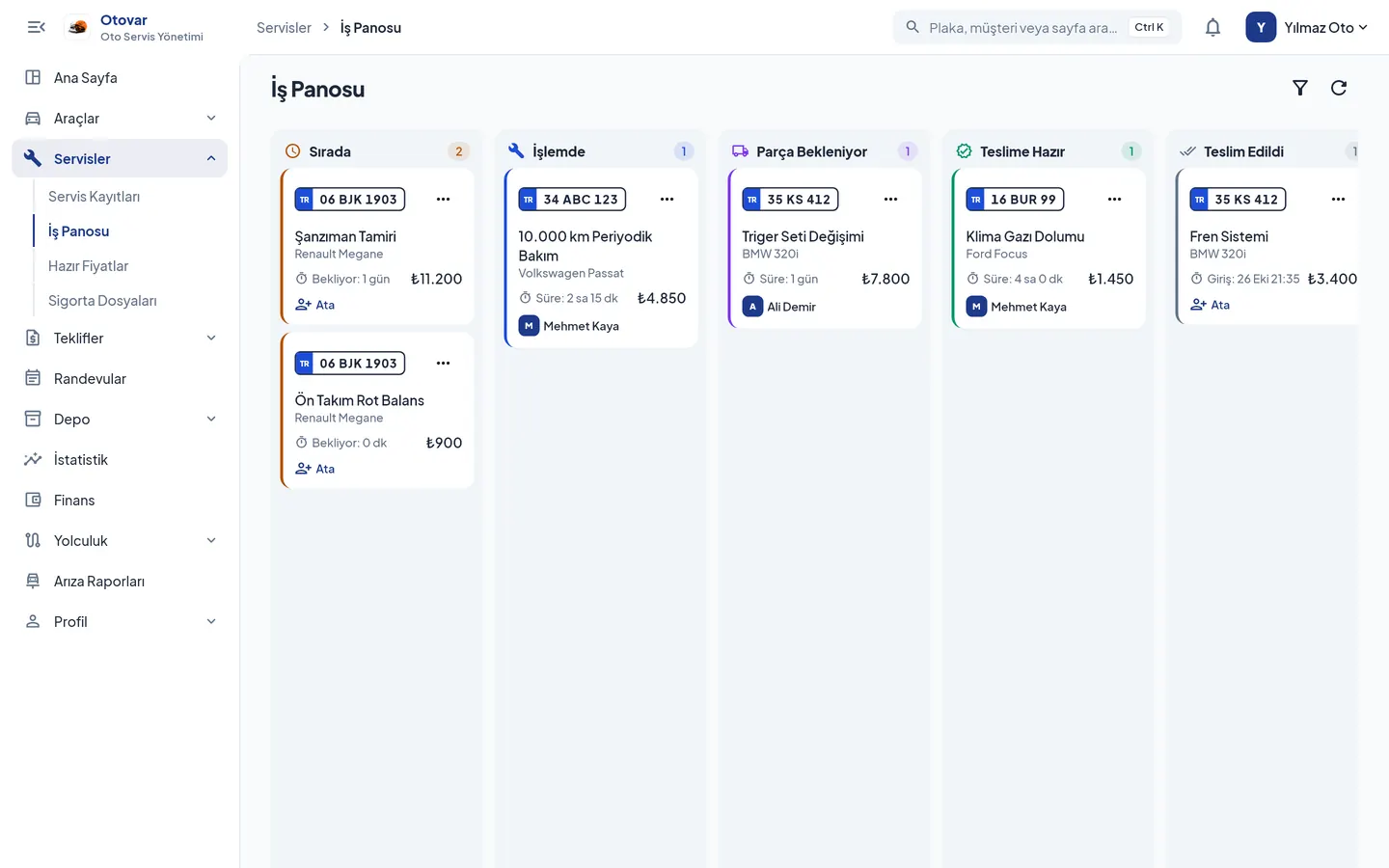
From service records to pickup, from quotes to stock, everything in one app. Open records on the desktop in your workshop and follow along from your phone.
- Easy service records: ready-made checklists for periodic maintenance, brakes, tires, air conditioning and more.
- Work board: see which car is at which stage and who on your team is working on what; the customer is notified when the car is ready.
- Quotes and appointments: prepare price quotes for your customers, respond to nearby quote requests and manage your appointment calendar.
- Team: add your staff, assign jobs and track bonuses.
- With Pro: warehouse, stock and shelves, PDF service reports with your logo, income-expense and customer accounts tracking, statistics.
Start free, upgrade as you grow
Otovar is free for car owners. Current prices are shown on the plans page in the app, in your country's currency.
Car owner
Free
- Unlimited cars and service history
- Reminders and expense tracking
- Quotes and appointments
- Optional ad-free plan
Mechanic · Free
For small workshops
- 25 service records per month
- Work board and checklists
- Price quotes and preset prices
- Vehicle check-in and handover forms
Mechanic · Pro
For growing shops
- Unlimited service records, ad-free
- Warehouse, stock and shelf management
- PDF service report with your logo
- Income-expense, customer accounts and statistics
- Appointment and fault reports
Get started in five steps
Download the app, create your account and choose your role. Then follow the steps that fit you below.
- Create an accountDownload the app, sign up with your email or Google account and choose the "Customer" role.
- Add your carIn the My Vehicles tab, enter the plate, make, model and mileage. You can optionally add the registration details.
- Connect with your mechanicYour mechanic's "My Pairing Code" page in the app shows an 8-character code and a QR code. Tap "Link to Mechanic" on your car and enter this code.
- Enter your datesUse "Km / Inspection" on the home screen to enter your inspection, traffic insurance and comprehensive insurance expiry dates; you'll get a notification when they're due.
- Stay on top of itWhen your mechanic opens a service, your car's status and extra work approvals arrive as notifications. Record your expenses with "Add Expense" and review them in the Statistics tab.
- Create your business accountWhen signing up, choose the "Mechanic / Shop" role and enter your business name and phone number. Your 8-character pairing code is created after sign-up.
- Complete your profileOn the Profile page, add your address, map location, working hours and logo so nearby car owners can find you.
- Connect your customerShow your customer the code or QR on the "My Pairing Code" page. For customers without the app, you can add the car yourself with its plate and phone number.
- Open a service recordWith "New Service", pick the jobs from a ready-made checklist and enter parts and labor. Send any extra work found during the service to the customer for approval.
- Manage from the board and hand overMove the car between stages on the Work Board and assign jobs to your team. When it's "Ready for Pickup", the customer is notified; you can also share the service summary via WhatsApp.
If you get stuck, write to us from Support in the profile menu of the app, or send an email to bilgi@kovakyazilim.com. Button names in the app change according to the language you choose.
Common questions
Is Otovar paid?
It's free for car owners. Mechanics can use it for free for up to 25 service records per month; the Pro plan adds unlimited records, warehouse and stock, PDF reports and finance. Plans are purchased in the Android app and also work on the computer with the same account.
Does my mechanic need to use Otovar?
Service records are created by the mechanic. If your mechanic uses Otovar, you connect with the pairing code; if not, you can still track your car's mileage, inspection, insurance and expenses yourself.
Who can see my data?
Everyone sees only the data they're authorized to see: car owners see their own cars, mechanics see the cars linked to them. Your expenses stay with you only, and your data is never sold. Details are in the Privacy Policy.
Can I use it on a computer?
Yes. The Windows version works with the same account as your phone; open records on a big screen in the workshop and follow along from your phone. You can download the Windows version for free from the Microsoft Store.
Which languages is it available in?
Turkish, English, Azerbaijani, Turkmen, Uzbek, Kazakh, Kyrgyz, Russian, Spanish and French.
How do I delete my account?
You can delete your account and data in the app via Profile > Delete My Account, or from the account deletion page.
Start your car's logbook today
Download Otovar for free; connect with your mechanic and never miss a date.